
Sentinel Audit365
Microsoft 365 is powerful. But is it configured properly?
The Microsoft 365 security audit that runs on its own: more than 180 checks every month, read-only, and a report that tells you what to fix, and in what order.
- Microsoft 365Protection score
- Entra IDIdentity and access
- Exchange OnlineEmail security
- Microsoft TeamsCollaboration
- SharePoint and OneDriveFile sharing
- ReportPrioritised actions
- LicencesCost optimisation
- Free testSPF, DKIM, DMARC
- 100% read-only
- No agent
- Certificate-based connection
- Every month
- First report within 48 h
Your protection, measured every month
Sentinel Audit365 is an automated Microsoft 365 security audit solution, developed and operated by SF2i. Every month, it puts your tenant through its checks and sums everything up in one score.
87%protection
Risk protection score
Weighted across 5 areas. Identity and email, the main attack vectors, weigh the most.
- Entra ID82%
- Exchange91%
- Teams88%
- SharePoint94%
- OneDrive76%
- 9non-compliant
- 6warnings
- 141compliant
- 28informational
- 80Microsoft 365 tenants audited so far
- 180+automated checks in every audit
- 3frameworks: CIS, ANSSI, Microsoft
- 100%read-only, no changes made
Why choose Sentinel Audit365?
More than 180 checks
Entra ID, Exchange Online, Teams, SharePoint, OneDrive and licences: everything is reviewed.
Automatic, every month
The audit runs on its own. You receive the report without launching anything.
Actions, not just findings
Each gap comes with the concrete actions to fix it, in order of priority.
Three frameworks
CIS Microsoft 365, ANSSI and Microsoft Security Baseline, in a single report.
Readable by management
A PDF summary and a written analysis, on top of the technical detail.
Nothing on your devices
No agent, no interruption: SF2i handles the setup.
One audit. More than 180 checks.
A few examples of what Sentinel Audit365 checks on your tenant, every month.
- MFA for privileged accounts
- Number of global administrators
- Legacy authentication blocked
- MFA fatigue protection
- Emergency access accounts
- Consent to third-party apps
- Guest account role
- Sign-ins by country
- Weak MFA methods (SMS, call)
- Accounts inactive for 90 days
- SPF, DKIM and DMARC
- Safe Links
- Safe Attachments
- SMTP AUTH disabled
- External forwarding
- Anti-phishing threshold
- Dangerous attachments
- Mailbox auditing
- Mail flow rules
- Unified audit log
- SharePoint external sharing
- Default sharing link
- Guest access expiry
- Anonymous Teams meetings
- Third-party Teams apps
- Ownerless teams
- OneDrive sync
- Unused licences
- Unused seats
- Audit log retention
Security comes first
Auditing security must not create a new risk.
Certificate-based connection to the Microsoft 365 APIs: no password to hand over.
100% read-only audit: no setting in your tenant is changed.
No agent to install on your computers or servers, no interruption.
Reports delivered to SharePoint, with an email summary.
5 domains under scrutiny
Each domain weighs in the score according to the risk it carries. A few example checks, with their references.
of the overall score: a foundational domain
Entra ID
Identity and access
The foundation of your environment: accounts, authentication, Conditional Access. It is the first target of identity theft attacks.
- MFA and Conditional Access
- Privileged accounts, guests
- Risky sign-ins, by country
Example result
- MFA for privileged accounts
- Number of global administrators
- Legacy authentication blocked
- Protection against MFA fatigue
- User consent to third-party applications
of the overall score: the main attack surface
Exchange Online
Phishing, domain spoofing, malicious attachments: email remains the entry point attackers use most.
- Anti-spam, phishing, malware
- DKIM, DMARC, SPF
- Volumes, quotas, quarantine
Example result
- SPF, DKIM and DMARC for every domain
- Safe Links and Safe Attachments
- SMTP AUTH disabled
- Automatic forwarding to external addresses
- Mailbox auditing
of the overall score
Teams
Collaboration
Open meetings, external access, third-party applications: Teams concentrates your exchanges with the outside world. The audit checks who gets in, and what they can do.
- Guests, meetings, external access
- Allowed applications
- Inactive or ownerless teams
Example result
- Anonymous users starting meetings
- Control given to external participants
- Third-party apps from the store
- Security reporting by users
- Teams with no owner or inactive for 6 months
of the overall score
OneDrive
Files and mobility
Each user's files, synced to their devices. The audit checks sharing, sync and actual storage use.
- External sharing and guests
- Usage rate
- Storage, top 15 users
Example result
- OneDrive external sharing level
- Guest access expiry
- Default link permission
- Sync restricted to company devices
- Resharing by guests blocked
Governance & licences
Across all 5 domains
Beyond security: licences, traceability and compliance. These optimisation checks do not count towards the score, but they often save money.
- Licences and subscriptions
- Logging and GDPR compliance
- Adoption and usage
Example result
- Licences on accounts inactive for 90 days
- Vacant seats and duplicate service plans
- Expired subscriptions or subscriptions in a grace period
- Microsoft 365 unified audit log
- Audit log retention period
Summary and protection score
How secure is your Microsoft 365, really?
One score, weighted by risk, every month.
Identity and email weigh the most, because that is where attacks begin.
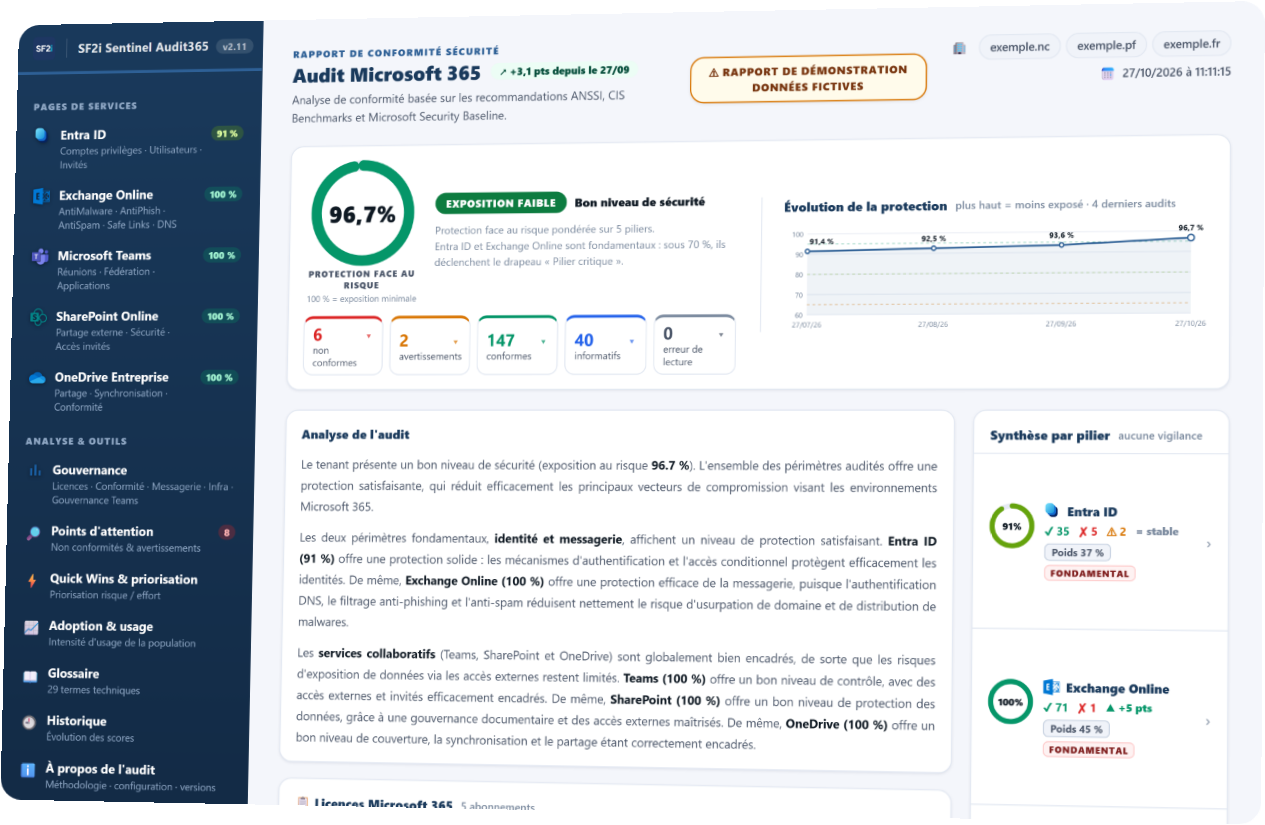
- Risk protection score: a score out of 100, weighted by area (email 45%, identity 37%…).
- Checks by status: non-compliant, warnings, compliant and informational, at a glance.
- Written analysis: the situation explained in plain language, readable by management.
- Summary by area: score, trend and points to address for each service.
Every area in detail
What exactly is wrong?
Each check, its expected value, its actual value and the fix.
With its CIS and ANSSI references, and its severity.
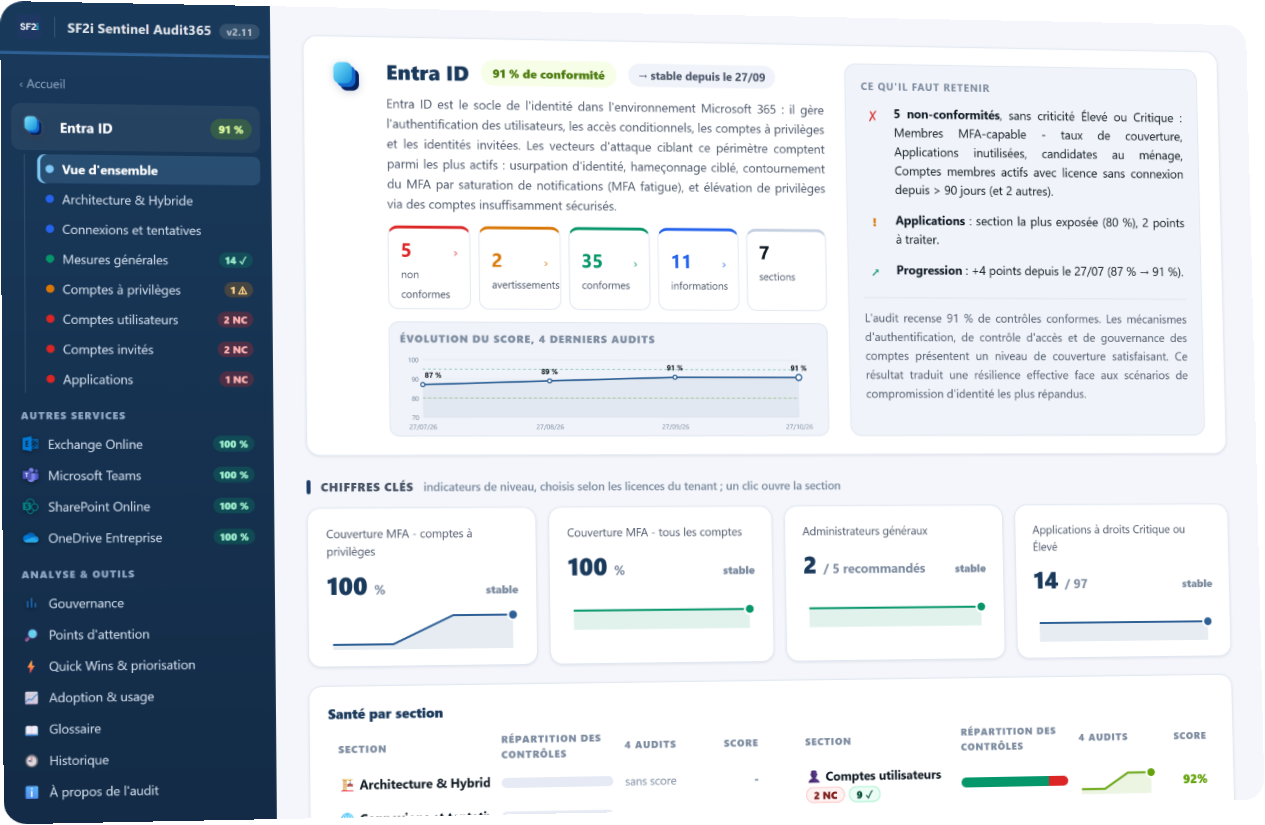
- Key takeaways: the points to address in the area, summed up in a few lines.
- Key indicators: MFA coverage, administrators, risky applications, depending on your licences.
- Health of each section: privileged accounts, guests, applications, over recent audits.
- What to do: for each gap, the concrete action and the remediation link.
Prioritisation and Quick Wins
Too many gaps to fix, where do you start?
Quick Wins first: high impact, low effort.
A risk/effort matrix to plan everything else.
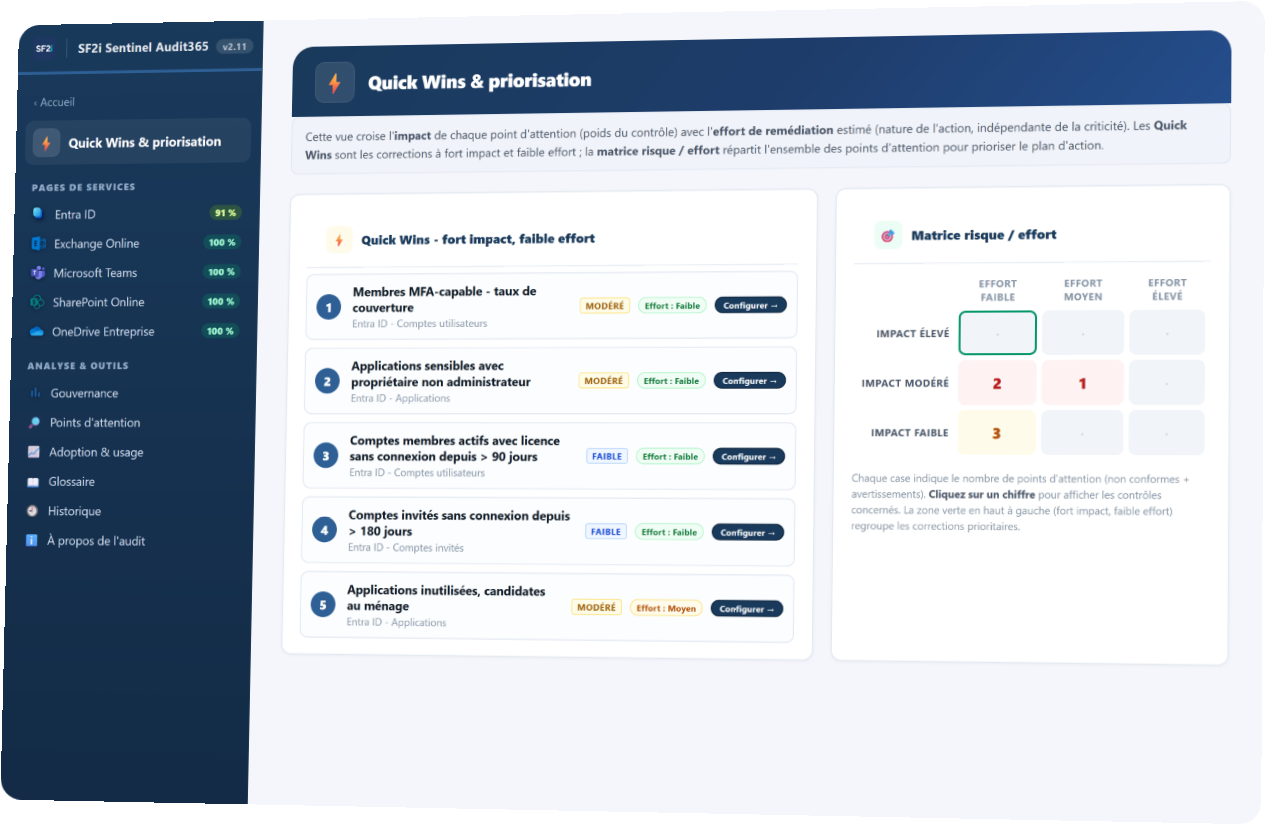
- Quick Wins: the fixes that reduce risk the most for the least effort.
- Risk/effort matrix: every point of attention, sorted to build your action plan.
- Severity from 1 to 5: each check weighs according to its real security impact.
- Remediation links: your teams go straight to action.
Progress, audit after audit
Are we really making progress?
Your score history, month after month.
What was fixed, what slipped back, what keeps coming back.
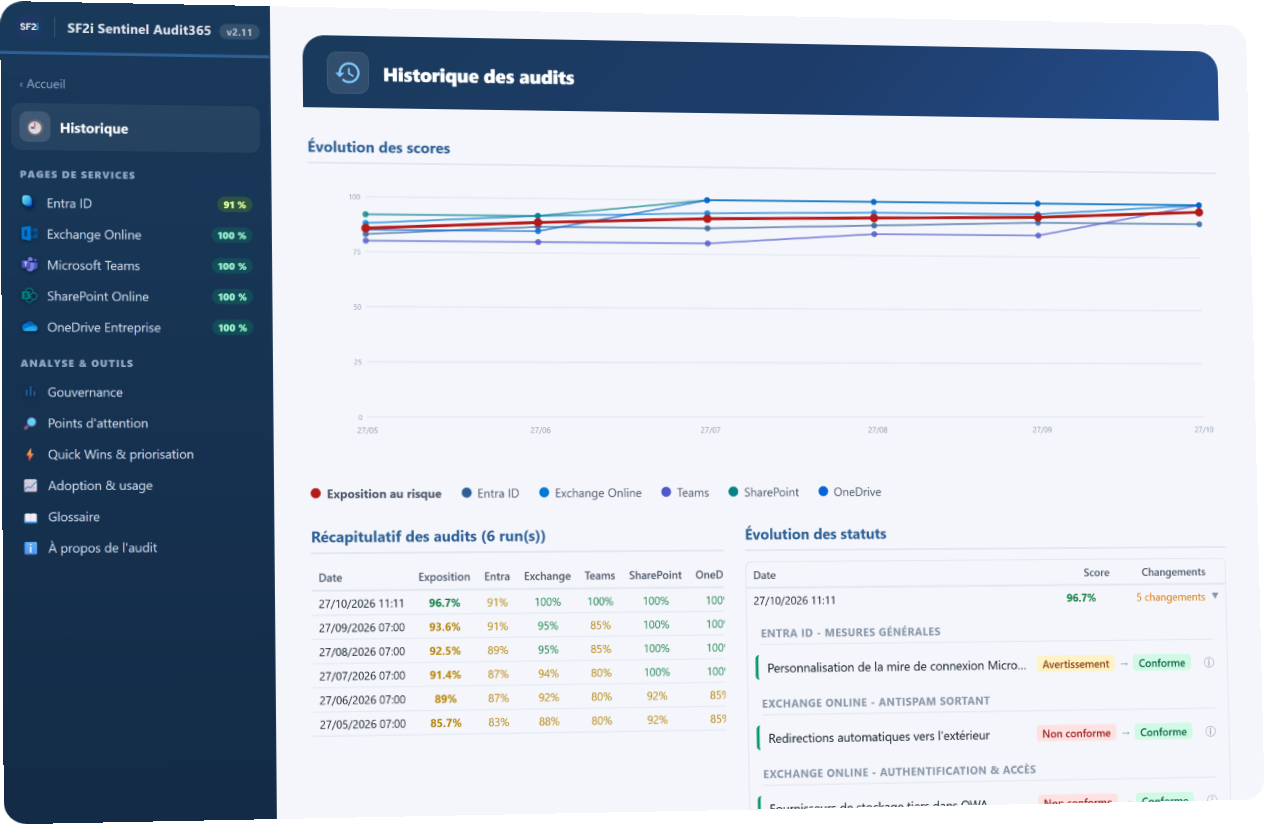
- Trend lines: the overall score and each area's score, audit after audit.
- Status changes: what went from non-compliant to compliant, and the reverse.
- Recurring issues: the points that keep coming back, to address for good.
- Drift caught early: a new gap shows up in the very next audit.
Adoption and licences
Are your Microsoft 365 licences really being used?
The real use of Microsoft 365, Copilot included.
And the licences you pay for without using them, identified.
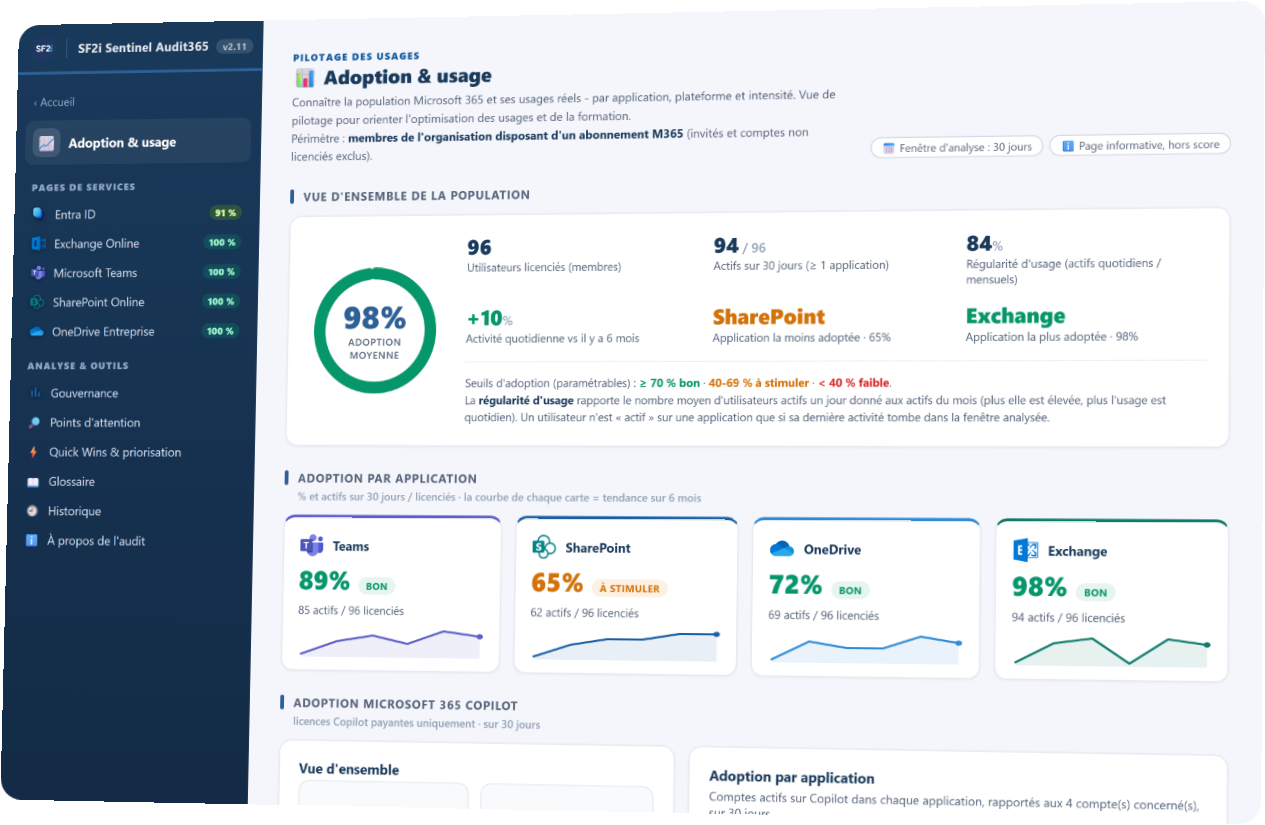
- Adoption by application: Teams, SharePoint, OneDrive, Exchange, active users.
- Microsoft 365 Copilot: real usage for the accounts that have it.
- Unused licences: inactive accounts, unused seats, duplicate plans.
- Quantified savings: in CFP francs (XPF) or euros, in the report.
See it in 45 seconds
The video is in French.
Test your email security in 10 seconds
Four public checks on your domain name. This is the bare minimum: if it is not in place, nothing else really is.
Results for What the test checks
- Mail serversPending
Where your emails arrive, and whether they are hosted on Microsoft 365.
- SPFPending
Which servers are allowed to send emails on your behalf.
- DKIMPending
Whether your outgoing emails are signed, to prove they come from you.
- DMARCPending
What recipients do with an email that spoofs your domain.
This test: 4 checks out of more than 180. The other 180 can only be checked from inside your tenant.
What no external test can see
- Admins without MFA
- Legacy authentication still open
- A mailbox forwarded outside
- Files shared with everyone
- Apps that read your email
Sentinel Audit365 checks them from inside your tenant, every month.
Frequently asked questions
Can the audit change my Microsoft 365 configuration?
No. Sentinel Audit365 is 100% read-only: it reads your configuration through the Microsoft 365 APIs and does not change any setting. Fixes remain in your hands.
Do I need to install anything?
Nothing on your workstations or servers: no agent is deployed. Only a read-only audit application is registered in your Microsoft 365 tenant, and SF2i creates and configures it for you. The audit platform is hosted and monitored by SF2i, and the connection to your tenant uses a certificate.
Which Microsoft 365 licences do I need?
The checks adapt to the licences in your tenant. Some protections, such as Safe Links and Safe Attachments, are only included with Microsoft Defender for Office 365: if your licence does not include them, the report says so clearly.
How often is the audit run?
Once a month. The report shows how your score changes from one audit to the next.
How does the subscription work?
Sentinel Audit365 is a subscription. SF2i sets up the connection to your tenant once, then the audit runs automatically every month: each report is placed in your SharePoint, with a summary by email. The price depends on the size of your tenant. It is set out in your quote, along with the commitment period.
How long does it take to get the first report?
Your first report is delivered within 48 hours, once access and the connection are set up.
Ready to see what your tenant is hiding? First report within 48 h.
A subscription, an automatic audit every month, nothing to launch. A first conversation is enough to get started. We work in New Caledonia, French Polynesia and France.
- New Caledonia+687 24 23 22
- French Polynesia+689 40 42 90 79
- France+33 2 96 47 48 05